MOLDS v0.85 · 380+ REVERSIBLE CONTROLS

Tune Windows, drivers and firmware. Keep every original.

MOLDS reads your PC, saves the original value of each setting before its switch changes it, checks what Windows reports afterwards and puts it back from the same switch.

Windows 10 & Windows 11 (x64) Direct switches, no blocking dialogs Restore always free

Current screenshots: v0.85

FREE · PREMIUM · ELITE

Start free with the Overview, History and 15 essential tweaks. Premium adds Windows, apps and Play; Elite adds hardware, kernel and BIOS.

OVERVIEW · LIVE LOAD & TEMPERATURES v0.85
PRODUCT SCREENOverview

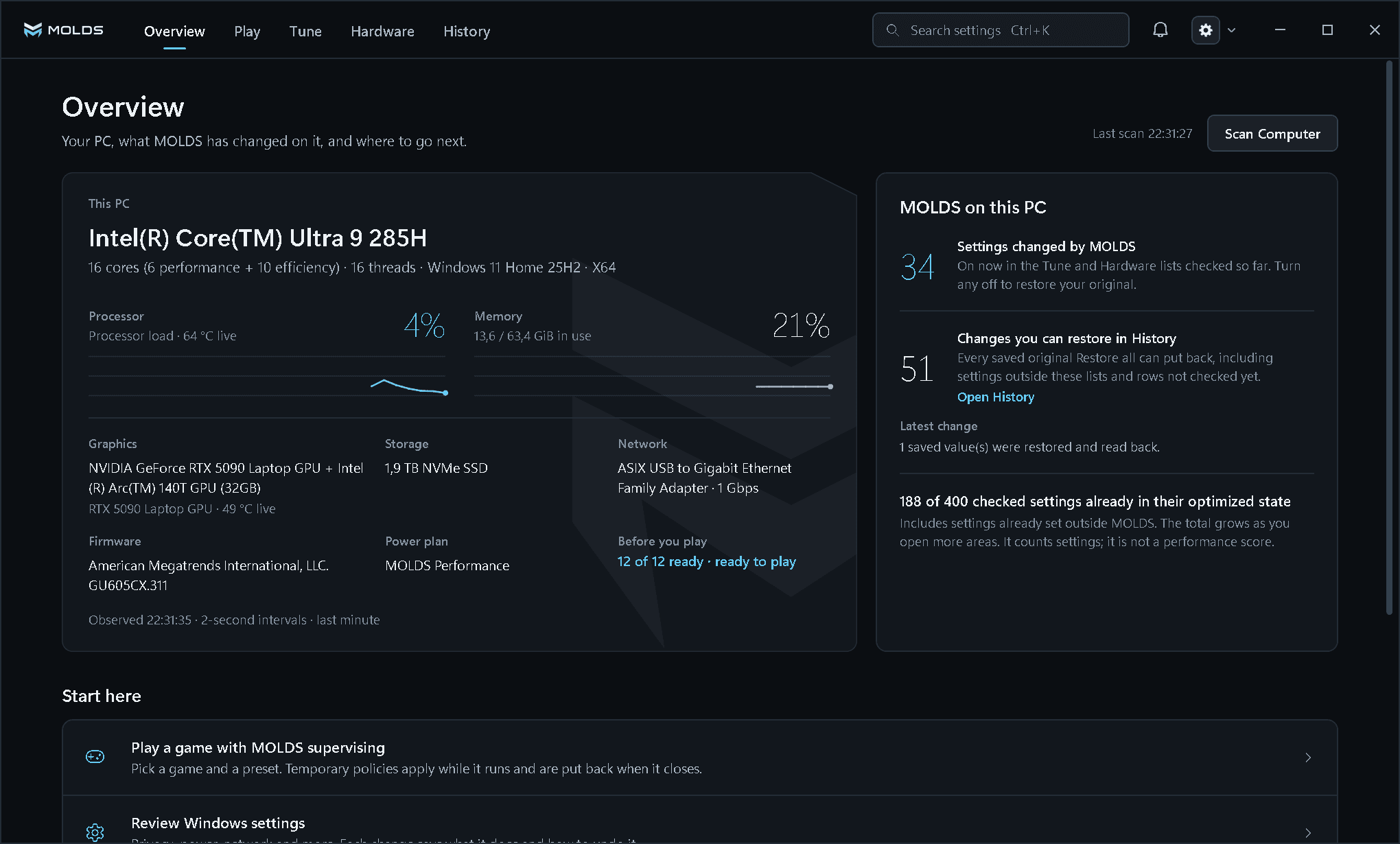
The Overview: processor load and temperature, memory, the detected GPU, storage, network, firmware and power plan, what MOLDS has changed, and the Play pre-flight result (12 of 12 ready). Pan the larger image to inspect the interface.

Open original file (opens in a new tab)
MOLDS Overview with the title bar (MOLDS emblem, Overview, Play, Tune, Hardware, History, Ctrl+K search, notifications and the Settings gear), This PC with live load and temperatures, and MOLDS on this PC
BEFORERead this PC
AFTERRestore any change
PRODUCT TOUR

Explore the MOLDS interface.

Screens of the v0.85 app: Overview, Play, Tune, Apps, Useful Programs, NVIDIA, CPU, BIOS, Account and Settings.

SYSTEM DETECTION

See what MOLDS found on this PC.

Processor load and temperature, memory, GPU temperature, storage, network, firmware and power plan, and what MOLDS has changed so far.

Live CPU and GPU temperature What MOLDS changed 12 of 12 ready to play
PRODUCT SCREENOverview

The Overview: processor load and temperature, memory, the detected GPU, storage, network, firmware and power plan, what MOLDS has changed, and the Play pre-flight result (12 of 12 ready). Pan the larger image to inspect the interface.

Open original file (opens in a new tab)
Overviewv0.8501/ 10
PRODUCT AREAS

From Windows privacy to the motherboard firmware.

Six areas. Each card says what it covers, what it needs and which plan unlocks it.

380+Controls in the MOLDS v0.85 catalogueAbout 350 of them appear on the pages of the development PC. Hardware pages follow the GPU, CPU and board MOLDS detects.
ELITE
42BIOS definitions

BIOS NVRAM & SCEWIN

Reads the motherboard's UEFI NVRAM and maps the settings your board exposes. The full variable is saved before any change.

  • Live UEFI NVRAM read and NVRAM backup export
  • 28 settings mapped on the ASUS GU605CX test board
  • AMI SCEWIN question binding where an OEM package is supported
  • Experimental writes · every change needs a restart
ELITE
32NVIDIA controls

MOLDS Driver Studio & GPU

Installs the latest Game Ready or Studio driver from NVIDIA without telemetry or the extras you switch off.

  • Signed packages from NVIDIA's own servers only
  • Telemetry, NVIDIA App, ShadowPlay and FrameView removed unless you keep them
  • Intel Arc / iGPU (11) · AMD Radeon (22)
ELITE
48hardware controls

CPU, RAM, NVMe & USB xHCI

P-core and E-core scheduling, idle and boost, memory, NTFS, NVMe and USB host controller latency.

  • CPU idle, scheduling & boost (19)
  • Memory, storage & peripherals (29)
  • USB xHCI MSI mode and interrupt priority
PREMIUM
260+Free + Premium controls

Windows, Privacy & 10 App Suites

The Windows, privacy, appearance and service controls, one-click suites for the apps you run while you play, and the tools you would otherwise download by hand.

  • Privacy (61) · Appearance (53) · Basic (23)
  • Services (27) and full Cleanup (8 locations)
  • App Suites (10): Steam, Discord, OBS Studio, Streamlabs, Spotify, browsers and Adobe
  • 11 Useful Programs, downloaded, checked and launched in one click
PREMIUM · ELITE
184power plan settings

MOLDS Power Plan & Network

Power and network tweaks on Premium; the MOLDS Performance plan, timers and kernel controls on Elite.

  • Power (40) · Network (36)
  • Mitigations (15) · Advanced (28)
  • BCD timers, NVMe and adapter bindings
PREMIUM
10Live Boost Controls

Play & Profile Vault

Pick a game and start a boost session. The boosts apply while it runs and are put back when it closes. Your whole setup can be saved as one .moldsprofile file.

  • CPU and I/O priority, P-cores, power plan, timer and network QoS while you play
  • System Pre-Flight Check (12 checks) and Auto-Boost
  • Export, import and batch-apply .moldsprofile
DIRECT INSTANT TOGGLE

One click on. One click back.

In MOLDS v0.85 a switch is the whole action: no confirmation dialog, no progress sheet. The backup, the change and the readback run inline on the card, and the same switch restores your original.

  • The exact original is saved and read back before the first write.
  • The switch moves only after Windows reports the new state; a refusal leaves it where it was.
  • Every change keeps a History receipt, and Restore all is free in every plan.
Direct Instant ToggleInteractive demo
Tune · AppearanceDisable transparency effects

Turns off Windows transparency for a lighter desktop compositor.

  1. 1Backup
  2. 2Apply
  3. 3Verify
  4. 4Restore
Ready

Transparency effects are On. One click turns them off; MOLDS saves the current value first.

Demonstration only: it changes nothing on this device. Timings measured by MOLDS v0.85 for a registry row on the development PC (41 ms apply, 25 ms restore); other controls can take longer.

COMPATIBILITY

Check the requirements before you run MOLDS.

MOLDS supports Windows 10 x64 (build 19041 or newer) and Windows 11 x64 and requires administrator access for system changes. A few Windows 11-only controls are marked Requires Windows 11 on Windows 10. Hardware pages follow the GPU, CPU and motherboard MOLDS detects.

Read the usage guide
Platform
Windows 10 & Windows 11 (x64)
Access
Administrator access required for system changes
Controls
380+ in the catalogue across Tune, Hardware and BIOS
Verification
Windows is read back after every change
OFF behavior
Returns the individual setting to its saved original
Plans
MOLDS Free, MOLDS Premium and MOLDS Elite
Licence
1, 2 or 3 PCs per key, each bound to a one-way hardware digest
Product status
v0.85 preview
Screenshot build
v0.85
PLANS

MOLDS Free, Premium or Elite.

Start free. Premium unlocks every Windows, privacy, app and Play control; Elite adds hardware, kernel and BIOS controls. Every price ends in .99.

MOLDS Free

Overview, History & essentials

0€

Free, no time limit

No key, no account, no expiryDownload MOLDS Free
  • Overview with system detection (9 hardware rows)
  • History & 1-click Restore, never locked
  • Basic Cleanup (user and Windows temp folders)
  • 15 essential Windows & Appearance tweaks
  • Read-only preview of the BIOS and hardware pages

MOLDS Premium

Windows, Privacy, Apps & Play

34.99€/ yr

Save 71% · Best value for Windows

2.92€ / mo equivalent · billed yearlyGet MOLDS Premium

Everything in Free, plus:

  • 260+ controls: Windows, Privacy (61), Appearance (53) & Services (27)
  • 10 App Optimization Suites (Steam, Discord, OBS Studio, Streamlabs, Spotify, browsers, Adobe)
  • Play: 10 Live Boost Controls, Auto-Boost & the 12-check Pre-Flight
  • 11 Useful Programs: download, verify & launch in one click
  • Full Cleanup: shader caches, Windows Update & crash dumps (8 locations)
  • Personal Profile Vault (.moldsprofile) & standard Network & Power tweaks

MOLDS Elite

RECOMMENDED

Full Hardware, Kernel & BIOS

49.99€/ yr

Save 72% · Full year of Elite

4.17€ / mo equivalent · billed yearlyGet MOLDS Elite

Everything in Premium (all 380+ controls), plus:

  • MOLDS Driver Studio (NVIDIA install without telemetry) + 32 NVIDIA controls
  • Intel Arc / iGPU (11) & AMD Radeon (22) controls
  • CPU P/E-core, idle & boost (19 controls)
  • Memory, NVMe & USB xHCI MSI mode (29 controls)
  • Advanced (28) & Kernel Mitigations (15), MOLDS Performance Power Plan (184 settings)
  • BIOS: 42 UEFI NVRAM definitions (live read, experimental writes)

Official prices in EUR. Checkout opens with the public release. One licence key activates the number of PCs you choose (1, 2 or 3) from Account > Activate & Bind to this PC.

FAQ

Practical answers before you begin.

Learn what MOLDS supports, when a switch is available, and what happens when you turn it off.

What does MOLDS change?

MOLDS has 380+ controls for Windows behaviour, privacy, apps, services, power, network, kernel mitigations, NVIDIA, Intel and Radeon graphics, CPU, memory and storage, BIOS NVRAM and game sessions. Each control says what it changes and how to undo it.

What do MOLDS Free, Premium and Elite include?
  • MOLDS FreeOverview, History with Restore, basic Cleanup and 15 essential Windows and Appearance tweaks.
  • MOLDS Premium260+ controls: every Windows, Privacy, Services and Appearance tweak, 10 App Optimization Suites, full Cleanup, 11 Useful Programs, Play with 10 Live Boost Controls and Auto-Boost, the standard Network and Power tweaks and the Personal Profile Vault.
  • MOLDS EliteAll 380+ controls: everything in Premium plus the MOLDS Driver Studio and the whole Hardware area (NVIDIA, Intel, Radeon, CPU, Mem & Storage, BIOS), Mitigations, Advanced and the MOLDS Performance Power Plan (184 settings).
How do I activate a licence?

Open Account in MOLDS, enter your e-mail and your MLD-PREM-… or MLD-ELITE-… key and choose Activate & Bind to this PC. Each PC you activate (1, 2 or 3, as bought) is bound through a one-way hardware digest. Deactivate this PC frees its slot for another PC.

I replaced one part or reinstalled Windows. Do I lose my licence?

No. MOLDS identifies your PC by four separate one-way hardware digests. If at least 3 of the 4 are unchanged (one part replaced, or Windows reinstalled on the same hardware), the key stays on the same PC at no cost and no Device Move is used.

How do I move my licence to a new PC?

On the old PC, open Account and choose Deactivate this PC, then activate on the new one. If the old PC is gone, use a Device Move: you get one after the first 30 days and one more each month on quarterly, annual and lifetime plans. You can also buy an Instant Device Move for 4.99€ in your MOLDS account.

Can one key cover more than one PC?

Yes. At checkout choose 1 PC (Standard), 2 PCs (Duo Pack, about 25% off the second PC) or 3 PCs (Squad Pack, about 35% off each extra PC). The key then activates that many PCs at the same time. Every price ends in .99, for example MOLDS Elite Annual for 2 PCs is 87.99€.

What happens if a key is shared?

Moving one key back and forth between PCs (three or more PCs within 30 days that no Device Move covers) counts as sharing. The licence server revokes the key and every PC using it returns to MOLDS Free. History and Restore keep working.

What is the refund policy?

If your key has never been activated on a PC, you can request a full refund within 7 days of purchase. Once a key is activated and bound to a PC, the sale is final and we do not offer change-of-mind refunds, even if you later free the slot — the only exception is a proven technical fault our team at [email protected] cannot resolve on a compatible Windows 10 or 11 (x64) PC. Not sure MOLDS fits your setup? Install MOLDS Free first and try it before you buy.

What happens to my changes if my plan ends?

Nothing is locked in: History, Restore, Restore all and turning off any tweak through its own receipt stay free in every plan.

How does MOLDS decide which controls are available?

A control is unavailable when MOLDS cannot find the device or setting it needs. The page of a GPU vendor that is not in the PC shows a read-only preview.

What happens when I turn a tweak off?

The same switch returns that individual setting to the exact value it had before you enabled the tweak.

Does MOLDS support Windows 10?

Yes. MOLDS supports both Windows 10 x64 (version 2004 / 20H2, build 19041 or newer) and Windows 11 x64.

Do I need administrator access?

Yes. Windows requires administrator access for the system-level changes exposed by MOLDS.

Where is the official MOLDS website, and how do I get help?

The official website is moldstweaks.com. For help with a licence, an order or the app, write to [email protected].

Are the product screenshots current?

Yes. The screenshots on this website were captured from the v0.85 desktop application.

IN ACTIVE DEVELOPMENT

Explore MOLDS before release.

Tour the current interface and follow the latest development notes.