PRODUCT FEATURES

380+ controls, from Windows to the motherboard firmware.

Windows, apps and Play on one side; hardware, kernel and firmware on the other. Every switch saves your original before it changes anything.

SIX AREAS

Each area has its own scope and plan.

Premium covers Windows, privacy, apps and Play. Elite adds hardware, kernel and BIOS. History and Restore stay free.

380+Controls in the MOLDS v0.85 catalogueAbout 350 of them appear on the pages of the development PC. Hardware pages follow the GPU, CPU and board MOLDS detects.
ELITE
42BIOS definitions

BIOS NVRAM & SCEWIN

Reads the motherboard's UEFI NVRAM and maps the settings your board exposes. The full variable is saved before any change.

  • Live UEFI NVRAM read and NVRAM backup export
  • 28 settings mapped on the ASUS GU605CX test board
  • AMI SCEWIN question binding where an OEM package is supported
  • Experimental writes · every change needs a restart
ELITE
32NVIDIA controls

MOLDS Driver Studio & GPU

Installs the latest Game Ready or Studio driver from NVIDIA without telemetry or the extras you switch off.

  • Signed packages from NVIDIA's own servers only
  • Telemetry, NVIDIA App, ShadowPlay and FrameView removed unless you keep them
  • Intel Arc / iGPU (11) · AMD Radeon (22)
ELITE
48hardware controls

CPU, RAM, NVMe & USB xHCI

P-core and E-core scheduling, idle and boost, memory, NTFS, NVMe and USB host controller latency.

  • CPU idle, scheduling & boost (19)
  • Memory, storage & peripherals (29)
  • USB xHCI MSI mode and interrupt priority
PREMIUM
260+Free + Premium controls

Windows, Privacy & 10 App Suites

The Windows, privacy, appearance and service controls, one-click suites for the apps you run while you play, and the tools you would otherwise download by hand.

  • Privacy (61) · Appearance (53) · Basic (23)
  • Services (27) and full Cleanup (8 locations)
  • App Suites (10): Steam, Discord, OBS Studio, Streamlabs, Spotify, browsers and Adobe
  • 11 Useful Programs, downloaded, checked and launched in one click
PREMIUM · ELITE
184power plan settings

MOLDS Power Plan & Network

Power and network tweaks on Premium; the MOLDS Performance plan, timers and kernel controls on Elite.

  • Power (40) · Network (36)
  • Mitigations (15) · Advanced (28)
  • BCD timers, NVMe and adapter bindings
PREMIUM
10Live Boost Controls

Play & Profile Vault

Pick a game and start a boost session. The boosts apply while it runs and are put back when it closes. Your whole setup can be saved as one .moldsprofile file.

  • CPU and I/O priority, P-cores, power plan, timer and network QoS while you play
  • System Pre-Flight Check (12 checks) and Auto-Boost
  • Export, import and batch-apply .moldsprofile
Play · Live Boosts v0.85
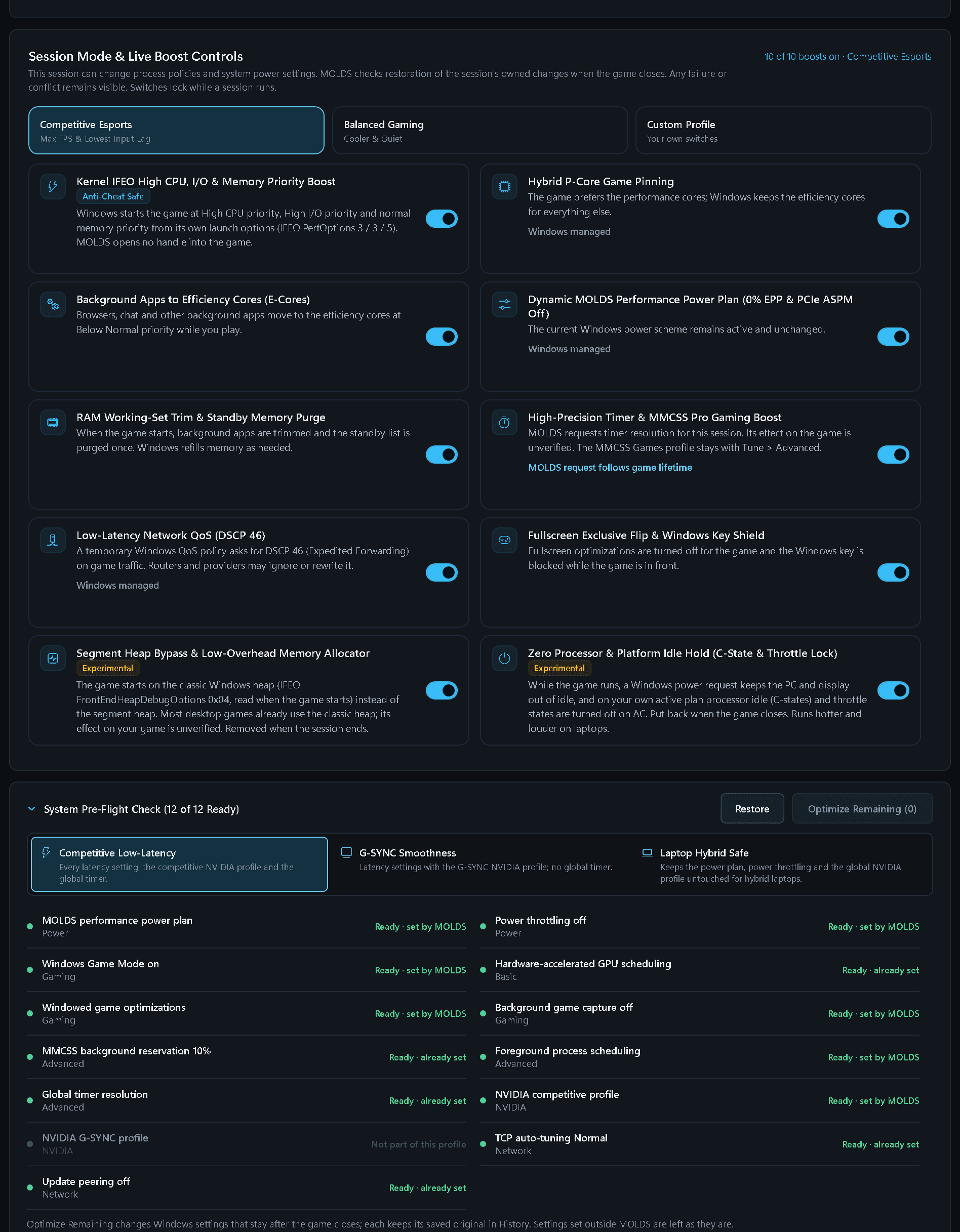
PRODUCT SCREENPlay · Live Boosts

The ten Live Boost Controls of a Play session and the System Pre-Flight Check with all 12 checks ready. Pan the larger image to inspect the interface.

Open original file (opens in a new tab)
MOLDS Play Live Boost Controls with ten switched-on boosts, including Segment Heap Bypass and Zero Processor & Platform Idle Hold, above the System Pre-Flight Check showing 12 of 12 Ready
PLAY · LIVE BOOST CONTROLS

Ten boosts while you play. All put back when the game closes.

Pick a game and start a session. The boosts run only while the game runs; MOLDS writes each one to a recovery journal first and restores it when the game closes, or at the next start if Windows stopped before that.

  • Competitive, Balanced or your own mix of the 10 boosts: process priority, P-cores, power plan, timer, network QoS and more.
  • The System Pre-Flight Check reads 12 settings before you play; Optimize Remaining sets the ones still missing.
  • Auto-Boost starts the session when a listed game opens.
TUNE · APPS & USEFUL PROGRAMS

The apps you play with, and the tools you would download by hand.

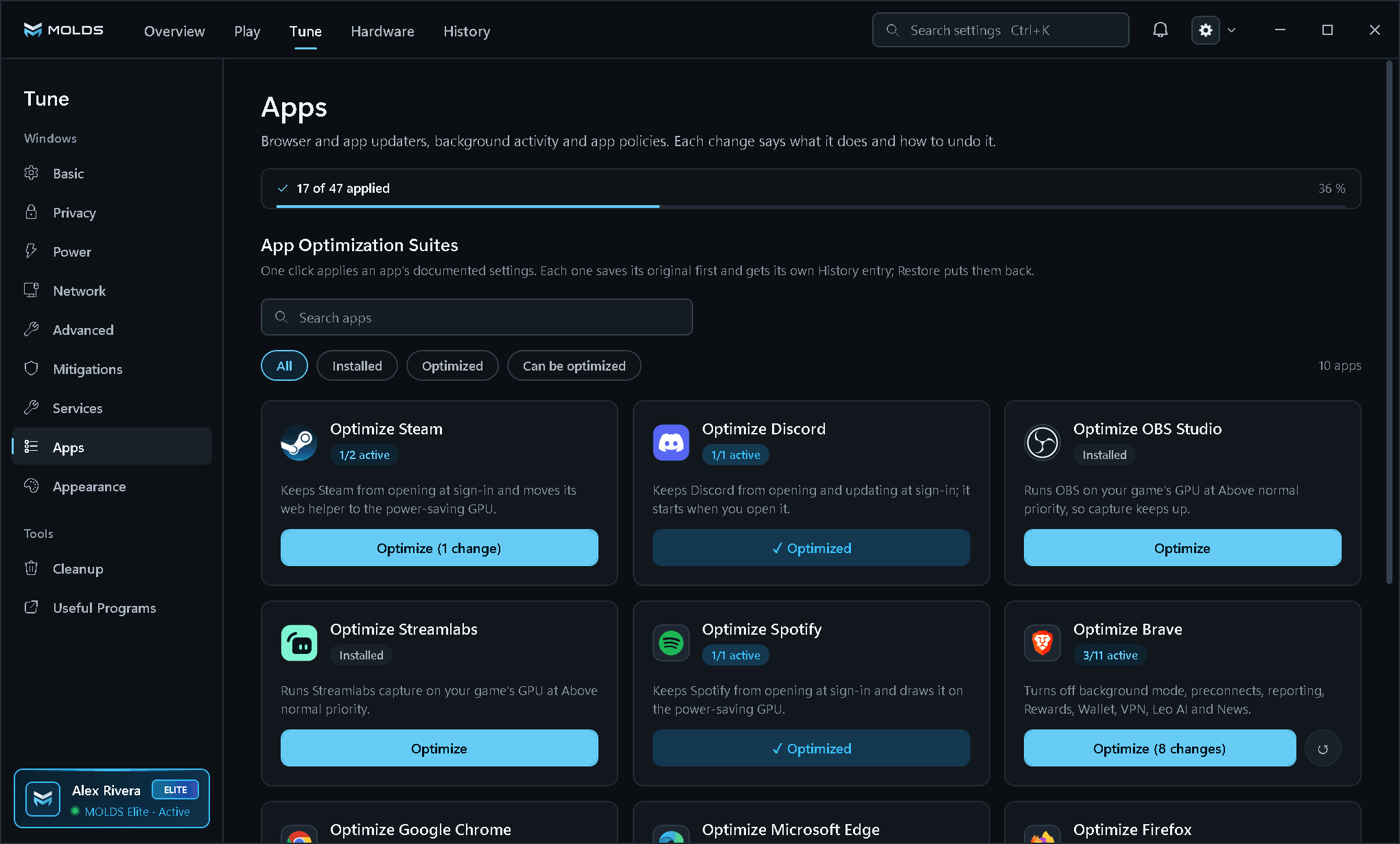
10 App Optimization Suites apply an app's documented settings in one click (47 settings in all); each setting keeps its own History entry. The bar at the top shows how many are applied.

11 Useful ProgramsMOLDS downloads each tool from its publisher, checks the signature or pinned SHA-256 and starts it. No browser opens.
Tune · Apps v0.85
PRODUCT SCREENTune · Apps

Tune > Apps: ten App Optimization Suites in MOLDS order (Steam, Discord, OBS Studio, Streamlabs, Spotify, Brave, Chrome, Edge, Firefox, Adobe) with the applied bar and its percentage. Pan the larger image to inspect the interface.

Open original file (opens in a new tab)
MOLDS Tune Apps page with a 17 of 47 applied bar at 36 %, and suite cards for Steam, Discord, OBS Studio, Streamlabs, Spotify and Brave
MOLDS DRIVER STUDIO

The latest NVIDIA driver, without the telemetry.

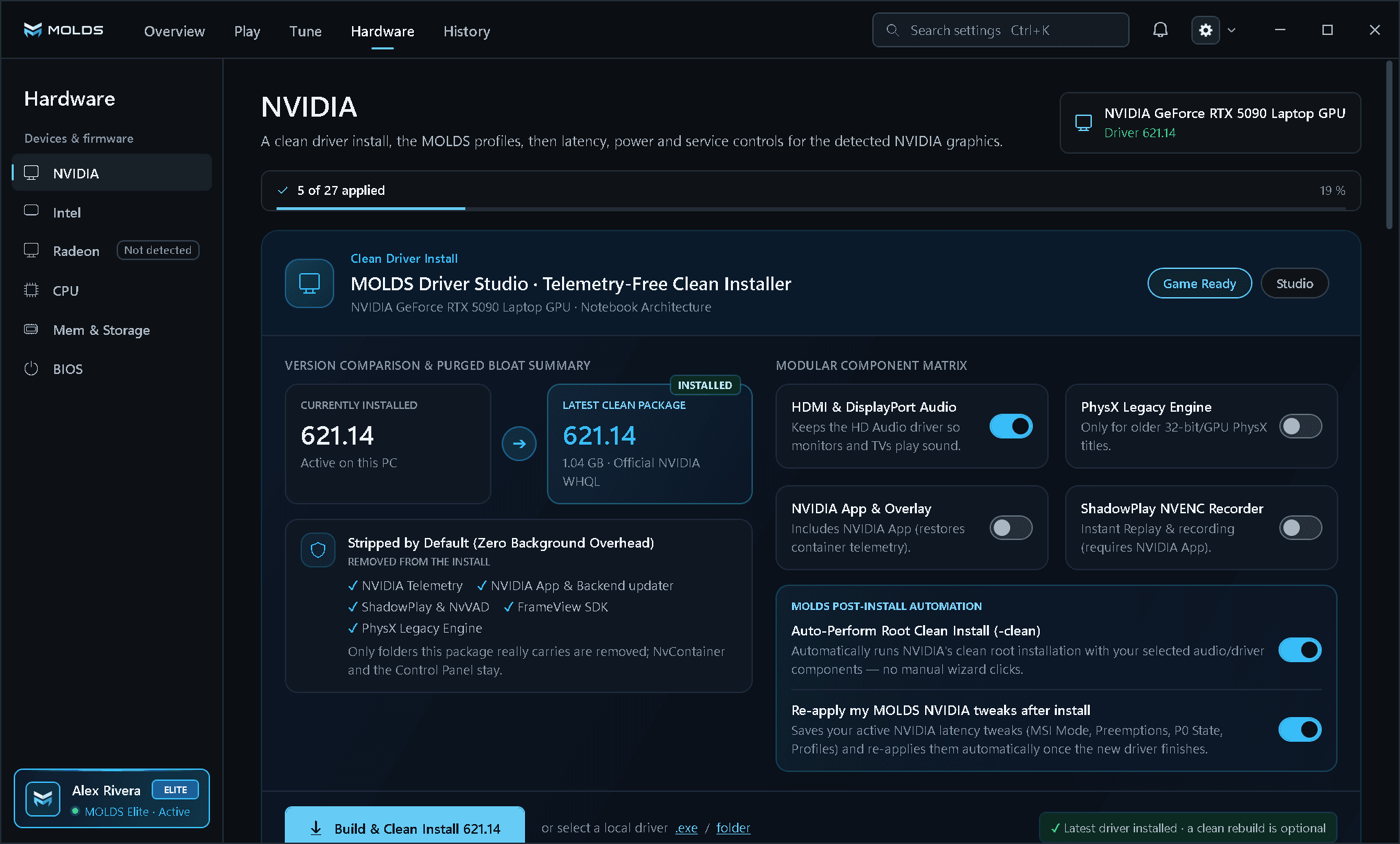
Hardware > NVIDIA opens on the MOLDS Driver Studio. Below it are 32 latency, power and service controls for the detected GPU.

  • Game Ready or Studio, downloaded only from NVIDIA's servers with a valid signature.
  • Telemetry, the NVIDIA App, ShadowPlay, FrameView and PhysX left out unless you keep them.
  • Intel Arc / iGPU (11) and AMD Radeon (22) pages for the GPUs in your PC.
NVIDIA v0.85
PRODUCT SCREENNVIDIA

Hardware > NVIDIA opens on the MOLDS Driver Studio: installed and latest driver, what is removed from the install, four component switches and two post-install switches. Pan the larger image to inspect the interface.

Open original file (opens in a new tab)
MOLDS Hardware NVIDIA page with the MOLDS Driver Studio comparing driver 621.14 installed and latest, the stripped components, the modular component switches and Build & Clean Install
BIOS v0.85
PRODUCT SCREENBIOS

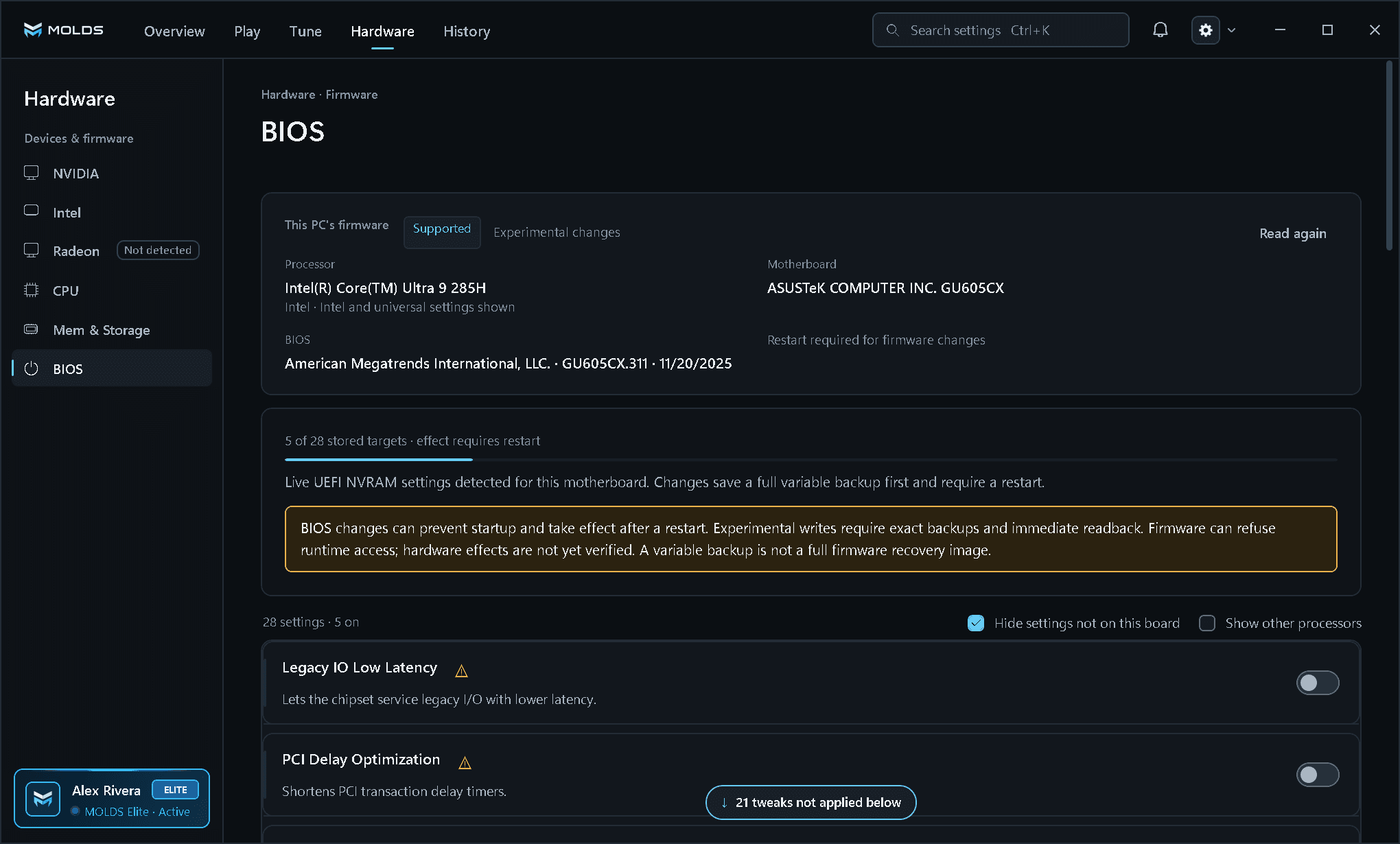
Hardware > BIOS reads the motherboard's UEFI NVRAM and maps the settings of this board. Every variable is saved before a change. Pan the larger image to inspect the interface.

Open original file (opens in a new tab)
MOLDS Hardware BIOS page with the firmware status, the mapped settings of this board and the restart warning
BIOS · UEFI NVRAM

Read the firmware before anything changes.

Hardware > BIOS reads the UEFI NVRAM variables live and maps the settings your board exposes: 42 definitions in the catalogue, 28 on the ASUS GU605CX test board.

Backup first, restart afterEvery change saves the full variable and its attributes first. Firmware writes are experimental and depend on what each motherboard allows.
CPU · MEM & STORAGE

Controls that follow the parts you have.

The detected processor, memory and system drive sit in compact pills at the top of each Hardware page; the controls below are grouped by purpose.

  • 19 CPU controls: idle states, P-core scheduling, boost and kernel worker threads.
  • 29 Mem & Storage controls: memory compression, NTFS, NVMe and USB xHCI MSI mode.
  • MOLDS Performance Power Plan with 184 settings, 15 kernel mitigations and 28 Advanced controls.
CPU v0.85
PRODUCT SCREENCPU

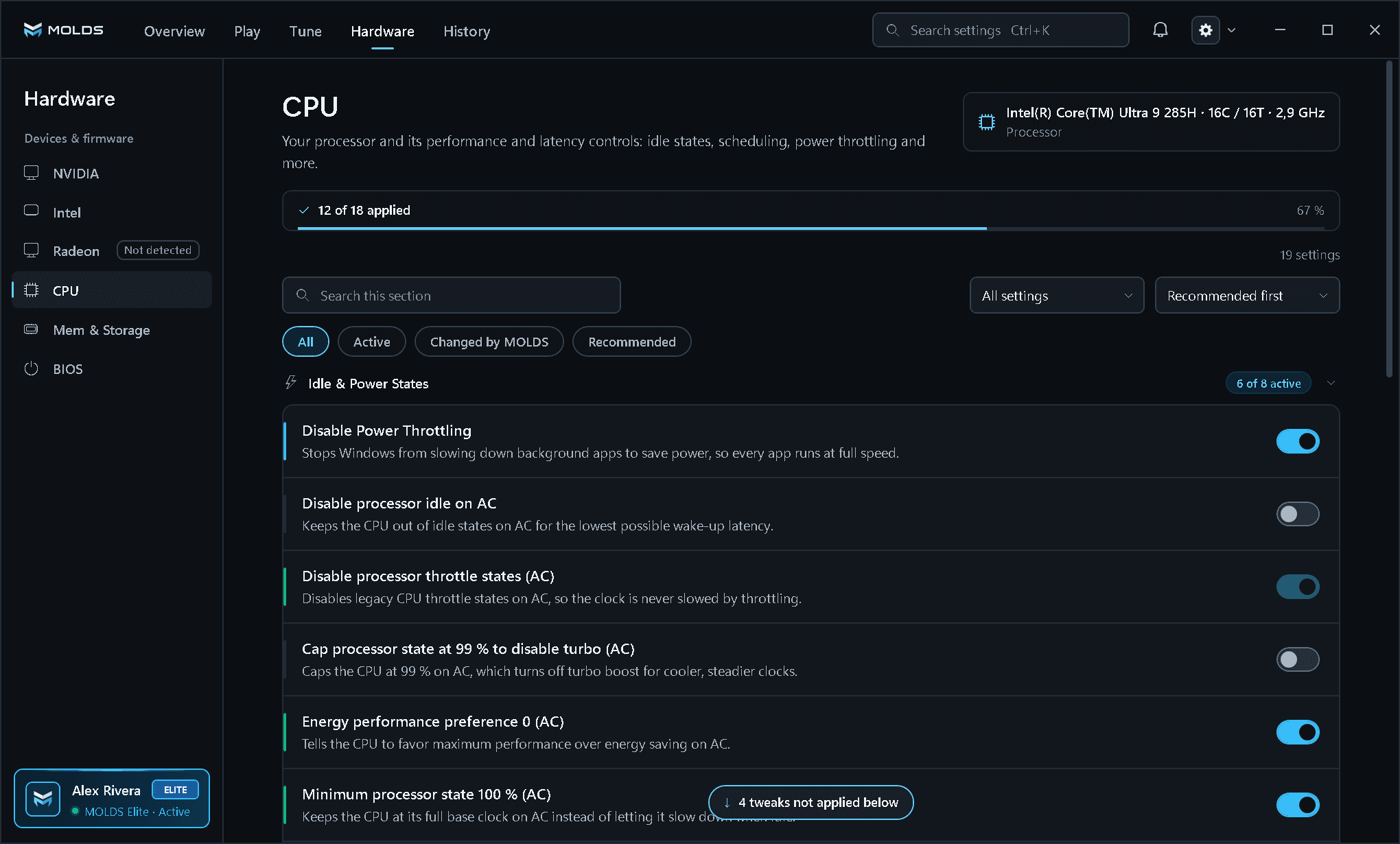
Hardware > CPU: the detected processor and 19 idle, scheduling and boost controls grouped by purpose. Pan the larger image to inspect the interface.

Open original file (opens in a new tab)
MOLDS Hardware CPU page with the Intel Core Ultra 9 285H pill, a 12 of 18 applied bar and the processor controls
Account v0.85
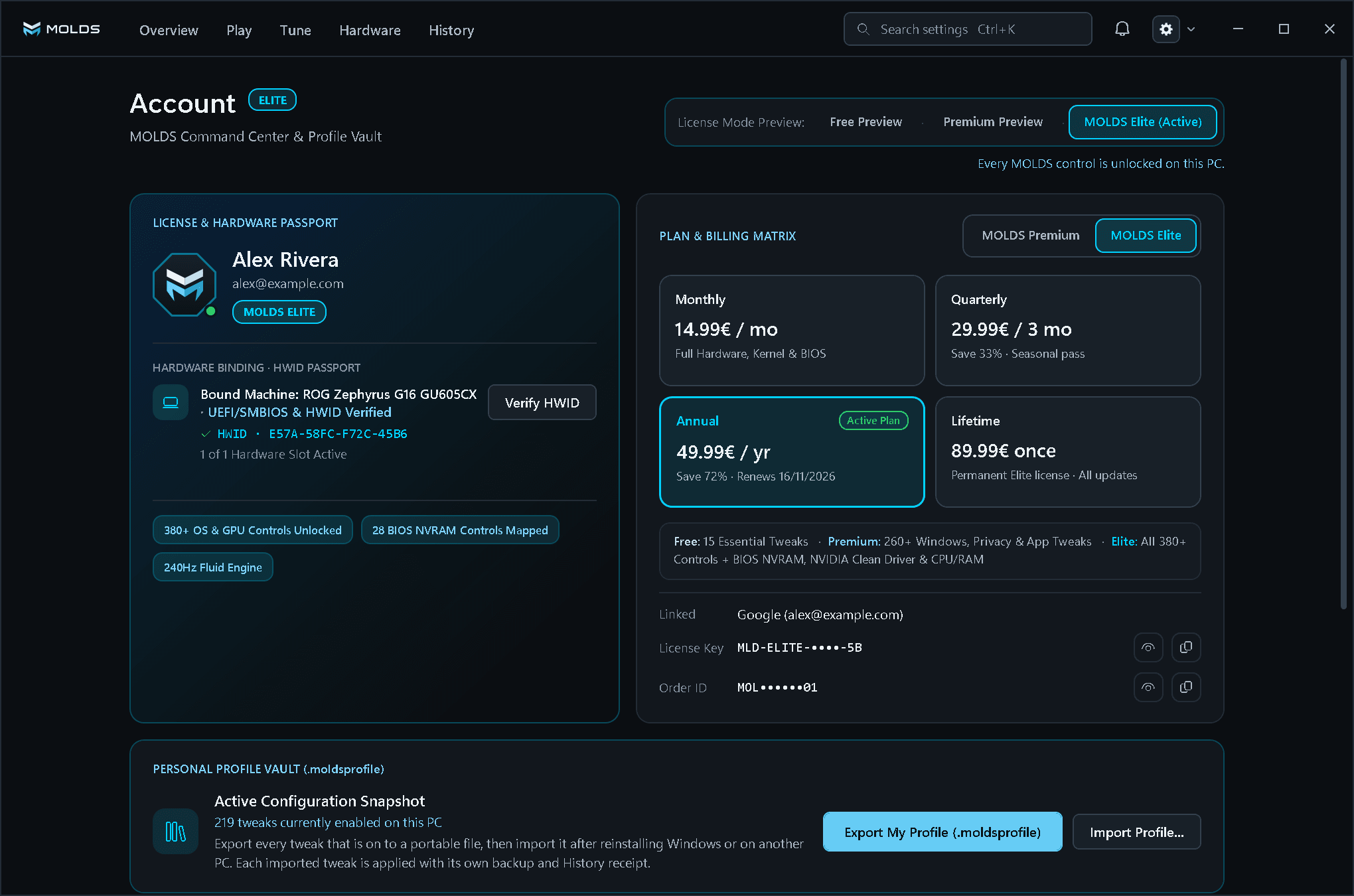
PRODUCT SCREENAccount

Account: licence and HWID passport, the Plan & Billing Matrix and the Personal Profile Vault (.moldsprofile). Pan the larger image to inspect the interface.

Open original file (opens in a new tab)
MOLDS Account page with the License and Hardware Passport, the MOLDS Elite plan grid and the Personal Profile Vault export and import buttons
COMMAND CENTER & PROFILE VAULT

Your licence, your hardware passport and your setup.

The Account page shows the plan, the PCs the licence is bound to and every tweak you have on, ready to export.

.moldsprofileExport the tweaks you have on, import them after a reinstall or on another PC and apply them with their own backups.
1, 2 or 3 PCs per keyEach PC is bound through a one-way hardware digest. Deactivate this PC frees its slot; a Device Move covers a PC that is gone.
Compare Free vs. Premium vs. Elite
IN ACTIVE DEVELOPMENT

Explore MOLDS before release.

Tour the current interface and follow the latest development notes.